Updated: April 22, 2026
If you already guessed what this article is all about, congratulations, you be wise. Well, what I'm going to write about today isn't novel or extraordinary. In fact, I had already written about in the past, across several different tutorials and rants. What makes today's piece relevant is the following. Soonish, there ought to be a new Ubuntu LTS. There's a pretty good chance you won't be able to use an X11 session thereon, in the Gnome desktop session. X11 ought to work, in Plasma and friends, though. Nevertheless, this future direction angers me, for pure usability reasons.
Now, you could say, but future, security. Indeed, the primary "argument" against X11 seems to be the scenario whereby rogue programs could read keystrokes. The super irony in this statement is that on any machine, a rogue program could do anything, and the best way to avoid problems is not to have rogue programs running. What makes this even more ironic is that you can have amazingly robust software sandboxing today, ten years ago in fact, without any need for any new fancy stuff. Let me show you.
Firejail
I have already reviewed this program a while back. Of course. So I'm not going to go into any great technical explanations why and how. In a nutshell, this nerdy tool lets you use all sorts of Linux sandboxing mechanisms to create separate resource spaces for different programs. Let me show you an example.
Firejail allows you to restrict network access. You can create a new rule by which a program may not have Internet access, like at all. As far as the firejailed program is concerned, it will look as if runs on a host without any network. You don't even need to setup any complicated profile:
firejail --noprofile --net=none "program name"
Let's say, as a most trivial example:
firejail --noprofile --net=none "path to your browser"
Your browser will launch, and it won't have any Internet. If you have any programs you don't want to access the Web, here's one quick and simple method. Best of all, you can create startup scripts and shortcuts, and thus run programs with one or more firejail rules, if you like.
But let me show you something ever cooler:
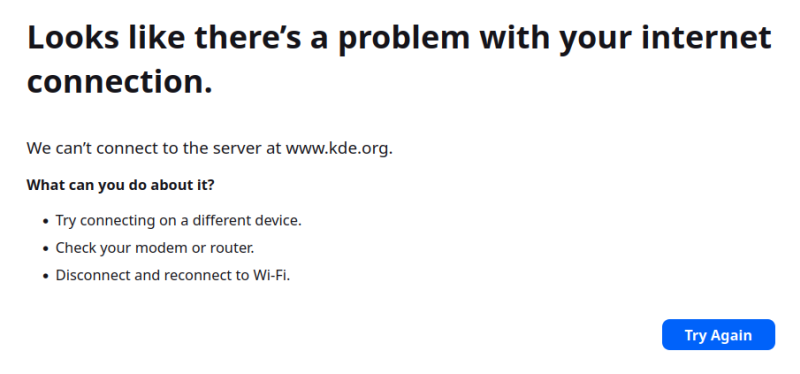
What do we have here? I actually launched the PDF program Okular with no-net option, and then clicked on the Donate button under Help. This opened Firefox, my default browser, but in the context of this launch, there ain't no Internet. Very neat and flexible.
There's more. A lot more. Now take a deep breath ...
Firejail lets you use AppArmor profiles, it allows you to even sandbox AppImage programs, limit network bandwidth, restrict access to certain directories, use chroot, bind programs to specific cores, limit program access to specific D-BUS interfaces, use separate DNS or network gateways, which can say be useful if you have multiple NICs, and you want to route traffic in a very specific way (like port-forwarding for a game), assign a different network address to your programs (or none at all), disable access to sound or video, use seccomp filters, rate resources like disk, memory or CPU, trace programs, sandbox X11 applications (hello!), and more. Everything and anything.
Let me show you another sweet example. Say, Viber, a chat program a-la WhatsApp or Telegram. However, unlike these two programs, Viber does not have a Web version, so you can't run it nicely sandboxed inside your browser. In Linux, there's a native AppImage available, and lo and behold, firejail comes with a built-in Viber profile. So you run the program so:
firejail --appimage --private --profile=Viber
/home/igor/Applications/Viber/viber.AppImage
Reading profile /etc/firejail/Viber.profile
Reading profile /etc/firejail/disable-common.inc
Reading profile /etc/firejail/disable-devel.inc
Reading profile /etc/firejail/disable-exec.inc
Reading profile /etc/firejail/disable-interpreters.inc
Reading profile /etc/firejail/disable-programs.inc
Reading profile /etc/firejail/whitelist-common.inc
Warning: networking feature is disabled in Firejail configuration file
Seccomp list in: !chroot, check list: @default-keep, prelist: unknown,
Parent pid 2153, child pid 2156
** Warning: dropping all Linux capabilities and setting NO_NEW_PRIVS prctl **
Mounting appimage type 2
Warning: skipping asound.conf for private /etc
Warning: skipping crypto-policies for private /etc
Warning: skipping ld.so.preload for private /etc
Warning: skipping mailcap for private /etc
Warning: skipping proxychains.conf for private /etc
Private /etc installed in 99.18 ms
Private /usr/etc installed in 0.00 ms
Warning: not remounting /run/user/1000/doc
Seccomp list in: !chroot, check list: @default-keep, prelist: unknown,
Child process initialized in 231.07 ms
And if you look in the corresponding profile under /etc/firejail, you will see these lovely bits and pieces:
...
caps.drop all
ipc-namespace
netfilter
nodvd
nogroups
nonewprivs
noroot
notv
protocol unix,inet,inet6
seccomp !chroot
disable-mnt
private-bin awk,bash,dig,sh,Viber
private-etc alternatives,asound.conf,ca-certificates,crypto-policies,fonts,hosts,
ld.so.cache,ld.so.preload,localtime,machine-id,mailcap,nsswitch.conf,
pki,proxychains.conf,pulse,resolv.conf,ssl,X11
private-tmp
...
Namely, the desktop program is sandboxed. It has no root, it cannot create new groups or request new privileges, it cannot sniff network, and its memory is heavily partitioned and private. For all practical purposes, among many other things, Viber can't see mount points, it has its private shell, it only sees itself under /etc, it has its own shared library cache, fonts and hosts file, its own sound, its own tmp, and its own X11, which is the would-be contentious point about X11 keylogging and snooping. Sweet, isn't it?
But that's not all. Indeed, firejail is part of a bigger bundle. If you install the package in say Ubuntu, you will get a lot of extras:
The following NEW packages will be installed:
firejail firejail-profiles libegl-dev libgl-dev libgl1-mesa-dev libgles-dev libgles1
libglu1-mesa-dev libglut-dev libglut3.12 libglvnd-core-dev libglvnd-dev
libglx-dev libice-dev libjs-sphinxdoc libopengl-dev libpthread-stubs0-dev libsm-dev libturbojpeg
libx11-dev libxau-dev libxcb1-dev libxdmcp-dev libxext-dev libxt-dev
python3-async-timeout python3-bcrypt python3-cpuinfo python3-decorator python3-dns python3-gssapi
python3-ifaddr python3-kerberos python3-lz4 python3-lzo
python3-nacl python3-numpy python3-opengl python3-paramiko python3-pyasyncore python3-pyinotify
python3-rencode python3-setproctitle python3-uritools
python3-zeroconf x11proto-dev xdg-dbus-proxy xorg-sgml-doctools xpra xserver-xorg-video-dummy
xtrans-dev xvfb
Hint, one very neat extra is Xpra ...
Xpra
Now, let's expand, shall we. Again, a familiar and awesome tool. I used it to create separate scaled instances of stubborn programs that do not readily obey HD/UHD displays in Linux, including programs built with rather unusual frameworks, and even WINE-run programs. But the best of bestest parts is that it allows you to run separate X11 server and client instances for each and every program. This effectively eliminates any keyboard snooping, because each program runs in its own isolated space. You can do this both locally and remotely, and then some.

And now together ...
Let's chain the toolkit. You can firejail and Xpra your programs as you see fit. In fact, if you look at the firejail man page, firejail uses Xpra for this very task, although you can use them separately. You can even use Xephyr, which I showed you in my guide on how to scale ancient games, like the legendary Caesar III or Pharaoh.
These phenomenal X11-capable tools are available in pretty much any Linux distro, out of the box. Sure, the usage isn't trivial, but it's there, and it can be implemented relatively quickly. Definitely more quickly than writing entire new display protocols and making software cooperate with it. This will work in old and new Linux, it does not depend on any particular desktop environment, there aren't a dozen implementations, you have total flexibility, and you can always run programs without any of these. In the "worst" case, you could ask for a simply GUI to set up and sandbox your software, but the effort needed is orders of magnitude less than any new "modern" re-imagining of the Linux desktop.
With these two tools, you can achieve similar levels of confinement and isolation that Flatpaks and snaps offer. In fact, you can do more, because you have the ability to blacklist and whitelist folders or resources that may not be declared in the manifests of these new-format packages. Yes, you need technical expertise, but for that matter, it takes 10-15 minutes of work to sandbox a repo-available program, without any major fussing.
Conclusion
What did I just do? Did I rant? Yes, of course, what else would you expect from a dinosaur. But, at the same time, I always find it funny that there needs to be a brand new "reset" in software development every few years. In a way, old tools out, new tools in, functionality remains the same, at best. Why? I guess that's the way of the world, and not strictly limited to Linux or FOSS in any way. But as I'm a Linux user, I do care, because soonish, important aspects of my day-to-day use could be affected.
If you're not 100% sure what my message is, well, I think there are lots of ways the Linux user experience can be improved. And it can be done with older tools, without any major development. Furthermore, I wanted to address a point that occasionally comes up in discussions vis-a-vis security. I don't mind good security design, but it also needs to address actual, legitimate problems. Of all the different issues that could arise in Linux, X11 snooping is not very high on that list. Or in meme terms, of all the things that don't matter, that one don't matter the most. What does matter? End-user functionality. Ah!
So there we are. Linux, sandboxing, past and future. Firejail, Xpra, the end.
Cheers.