Updated: August 19, 2026
Let's say you have an older smartphone that no longer receives any updates from its manufacturer. It may even be "stuck" on an older release of the operating system, for whatever reason. The device is several years old, and while it is receiving app updates through the relevant app store, you don't consider it useful enough for everyday business. You might want to replace it. Well, before you do that, hear me out.
Smartphones that you no longer wish to use for everyday browsing or whatnot can still be useful for several more years serving as an offline 2FA authentication tool, your own custom hardware token. This may sound a bit avantgarde, especially the offline adjective, but let's explore. I'm going to show you a somewhat clunky yet neat trick on how to accomplish this, and give elderly phones a fresh breath of practical life.
One Time Tokens ain't magic
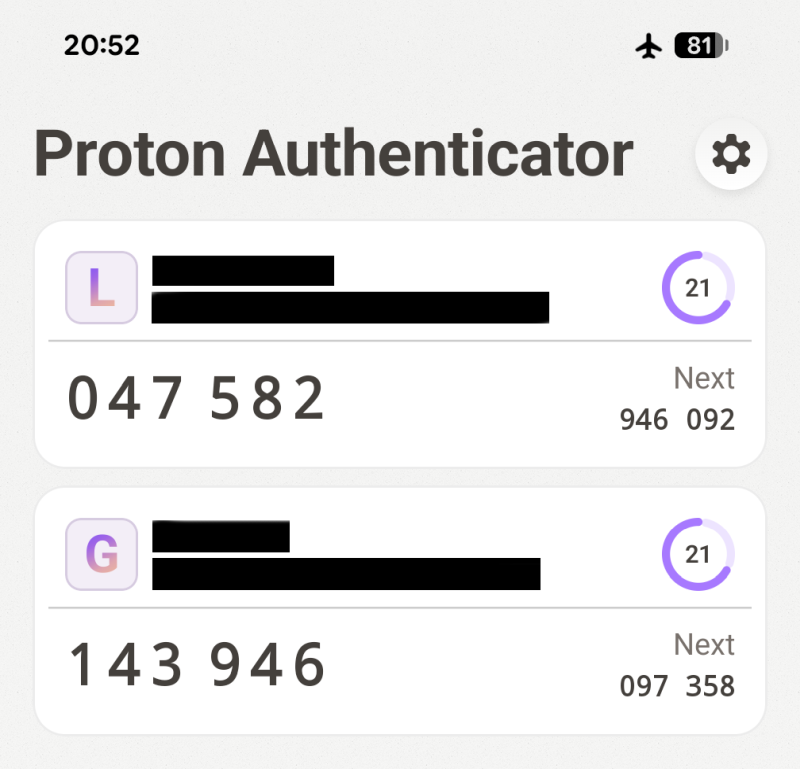
Most services utilizing Two-Factor Authentication time-based one-time password tokens (TOTP) follow a common standard. Technically, to generate the necessary code, a software tool that uses the standardized algorithm requires a unique "seed" and accurate current time to compute the necessary sequence of digits. Typically, TOTP will be six digits long and valid for 30 seconds, although the duration can be longer.
This algorithm can be expressed in many ways, including simple Python or Perl utilities for the Linux command line. In fact, you could write your own in any scripting or programming language you like. For most common users, there are nicely packaged GUI tools like Google Authenticator or Proton Authenticator that simplify the process. You have the software rotating the OTPs for you, and you input the right one when needed.
So how does an old phone feature in this scenario?
Well, before you decide to put it on the proverbial shelf forever, you could install one or more common 2FA apps on it, and then put it to good use. Here's what I have in mind.
The repurposing
Take your old phone and complete the following steps:
- Install your desired 2FA app (one or more).
- Verify that it can scan QR codes. Alternatively, you will need to manually provide seeds (secrets) with each new code.
- Once you're happy that the utility works, put your old device into Airplane mode. Now, it's offline, and will no longer have any network access. You can even take the SIM card out.
- Scan, input or import as many codes as you like, any which way you like.
And that's it. Your phone is now an offline token.
Wait, wait, what about accurate time!
Ah yes. This is going to be a problem. To generate relevant codes, you need relevant time. Technically, your 2FA apps will always generate codes, but if the device's date and time are set incorrectly, they will generate said codes at the "wrong" moment. You need to make sure your phone has the right temporal settings.
But how do you do that, if your device is offline?
Time configuration
Technically, you have two options:
- First, if you want to retain the SIM card in the old device, then you can simply turn off any data, mobile or Wireless, and let your phone sync its time with the cellular network, if possible. Your phone will have no Internet access. It will still act as a phone, but not as a modern device.
- Second, if there's no SIM, and/or the phone is fully offline, in Airplane mode, your device's clock might eventually drift over time, up or down. For instance, after a month, the phone may lag by three minutes. Thus, if you want to use if as an authenticator, you need to fix the time.
To that end, you should manually adjust time BEFORE using the codes. Here's the workflow:
- Take your phone, go into the Time & Dates settings.
- Select manual settings options (however labeled).
- Check the actual, accurate time on a different device, say a new Internet-connected phone or your laptop or anything that syncs its time correctly. For the sake of this section, let's assume the time is 20:45 (in the full 24-hour 00:00 format).
- Set the clock one minute ahead but don't click OK just yet. In this case, 20:46.
- Wait until the time actually changes to 20:46 on the other device.
- Click OK.
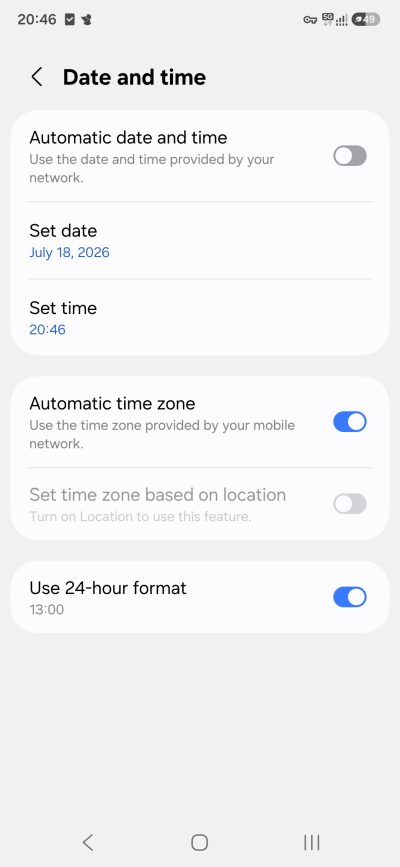
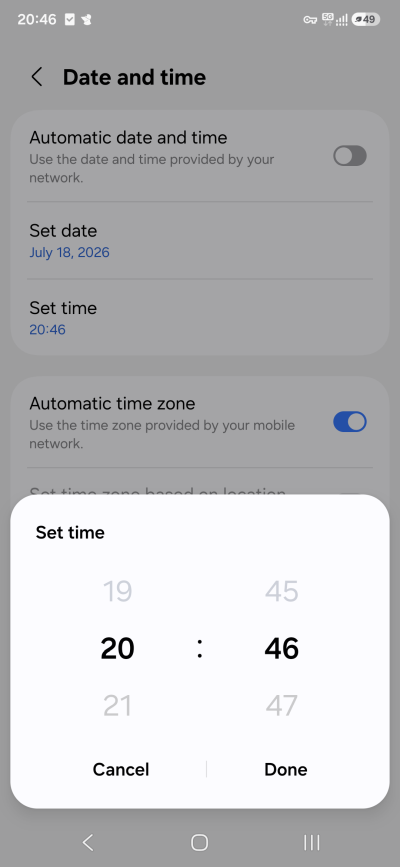
At this moment, your offline phone's time will be 20:46:00. Depending on how quick your fingers are, it will actually lag 1-3 seconds after the actual time, from the moment you saw the time change on the other device, and hitting the OK button. Now, a small time drift can always happen, even with fully connected phones, so you can always assume the first and the last few seconds of any TOTP may not be correct, but you will have the bulk of time in the "middle" in which the time will be accurate.
Does this work?
Absolutely. I've tested this multiple times. I even had a phone turned off, and when I powered it on almost a month later, the date was off by three days, and the time was totally wrong. But I used this method to correct the time, and then compared the TOTP shown in the 2FA apps on this offline device to TOTP shown in the same apps on an up-to-date, Internet-connected phone. I even cross-referenced results from multiple different apps, to see if everything works correctly.
It does. The solution is a bit clunky, and you may need to occasionally change the clock, but you have an offline authenticator. Secure, convenient, and not in any way connected to the Web. Like the offline hardware tokens of yore.
Conclusion
I know my solution is quite hacky. And it's not very convenient, but it does allow you to make good use of ancient phones without throwing them away. One, you can have an offline solution, which is more secure than anything connected to the Internet. Two, you have full control over your device. Three, you can use the old phones as backup token generators, so if your main device gets broken, stolen, loses battery or whatnot, the second authenticator should still work and give you the necessary codes.
Of course, the old phone too could leave for the microchip pastures early, on account of its age or use. Or you may find the entire model too cumbersome for everyday use. And I do agree, what I suggest isn't convenient or quick. But your offline authenticator should work as long as the device lasts and/or its camera does, and it will work regardless of any changes in software, be it the operating system, its associated frameworks or future updates to the apps themselves. And finally, if you wonder, why offline, well, authenticators do not really need any network connectivity. So there. Hopefully, this odd little guide will come handy. Or not, at all.
Cheers.