Updated: September 24, 2023
Using the "modern" Internet without an adblocker is an exercise in stupidity, futility and wasted bandwidth. Three decades of computer usage on, I am still waiting for the first ever useful or relevant ad to be shown to me, in some shape or form. Oh, that's right, ads are pointless, and they only work for people whose IQ hovers in that sweet 85-90 range. Hence, using and adblocker is important. The best of all? UBlock Origin, which is also available for Firefox on mobile, what what.
Now, recently, I noticed, mostly in Edge on Linux, and occasionally a few other Chromium-based browsers, that UBO loads with a yellow exclamation mark on its icon. If you expand, it says: Could not filter properly at browser launch. Reload the page to ensure proper filtering. Hm, not good. I mean, the fix is trivial, but the implications are not. If the browser launches and the filtering AKA adblocking & tracker-blocking is not working correctly, then your browser may be leaking information. Let's systematically fix this.

Implications & solution
Well, the thing is, if you're using an adblocker, you want it to do its job fully and correctly, all the time. That means you want it to load BEFORE any page content is shown. At browser startup, this could be an issue. Now, there are ways to prevent it, e.g.: load the browser with an empty page (about:blank). But if your browser points to a page, like say a search engine, or you load a saved session, there might be issues.
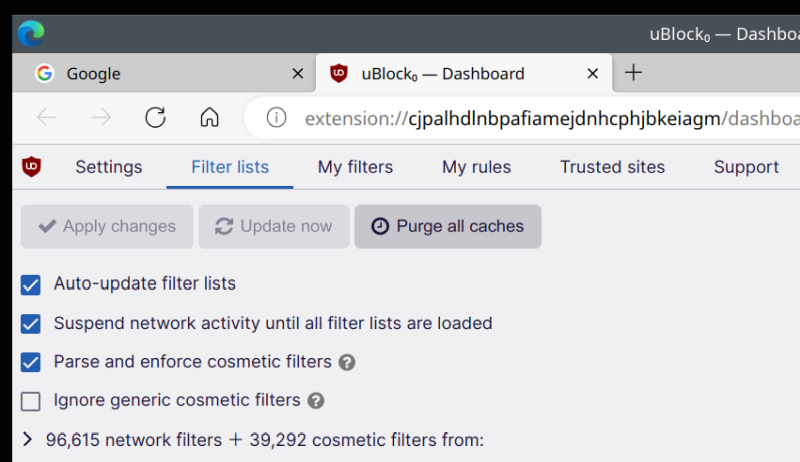
The proper solution is to actually tell UBO to not load pages until it's loaded its filters. This is similar to what VPN clients can do - they block network traffic if the connection drops or needs to be reestablished, to prevent any data leakage.
Expand the UBO icon, click on Settings (the cogwheel icon). Then, under Settings, click on Filter lists, and check the option that says: Suspend network activity until all filter lists are loaded. And that's it, job done. The browser's startup page(s) may take a few milliseconds longer to load, but you won't accidentally leak data or be shown ads. Boom. Now, you will have proper adblocking, all the time.
Conclusion
I don't know why this issue occurs in Chromium-based browsers. I've never seen it take place in Firefox, although the extension options are the same. Well, no matter. We know what to do, and how to prevent possible nonsense from assailing our eyes and intelligence. UBO for the win.
As a side comment, I would also recommend you consider Noscript, which blocks scripts and tons of other content. This means that if pages cannot load their scripts, they most likely, 99.99% of the time, will also not load any ads. So even if you get a temporary hiccup with adblocking, you're still covered. And vice versa. This ain't a solution for everybody, but then not everybody reads my website, and if you do, then yes, it is a solution for you. Take care, fellow Internetians, and may the intelligence be strong in you.
Cheers.