Updated: March 27, 2026
Hello there, Internetians. Do you like weird problems? I know I do. Lo and behold, as I was merrily using a Windows 10 host, I suddenly noticed an audit failure in the Event Viewer. I had opened this utility to check something completely unrelated, and then, there it was, event ID 4625, category Logon. The system was telling me about a logon request failure. The text read: an account failed to log on. What what.
Let me ask you another question? How would you feel if you suddenly discovered a failed logon attempt at your system, but one which you definitely have not initiated? Of course, this wasn't a message I could disregard lightly, but then, very quickly, I learned what it was all about, and why I could dismiss it lightly. Let me elucidate.
Problem in more detail
So, let's analyze the audit failure text a bit more:
An account failed to log on.
Subject:
Security ID: HOST\Dedoimedo
Account Name: Dedoimedo
Account Domain: HOST
Logon ID: 0x3F3B7
Logon Type: 3
Account For Which Logon Failed:
Security ID: NULL SID
Account Name: Guest
Account Domain: HOST
Failure Information:
Failure Reason: Account currently disabled.
Status: 0xC000006E
Sub Status: 0xC0000072
Process Information:
Caller Process ID: 0x1854
Caller Process Name: C:\Windows\explorer.exe
And some extra text:
This event is generated when a logon request fails. It is generated on the computer where access was attempted. The Subject fields indicate the account on the local system which requested the logon. This is most commonly a service such as the Server service, or a local process such as Winlogon.exe or Services.exe. The Logon Type field indicates the kind of logon that was requested. The most common types are 2 (interactive) and 3 (network). The Process Information fields indicate which account and process on the system requested the logon ...
From this audit failure, it would appear that the Guest account attempted to logon, but that account is disabled. The activity was generated by the explorer.exe process. On its own, it sounds rather sinister, but then, there really was nothing happening on the affected machine. Well, not entirely correct. I was working on the system, and I was doing certain things. Perhaps not things that ought to be related to any logon, and then it dawned on me.
Solution, or rather, reason not to worry
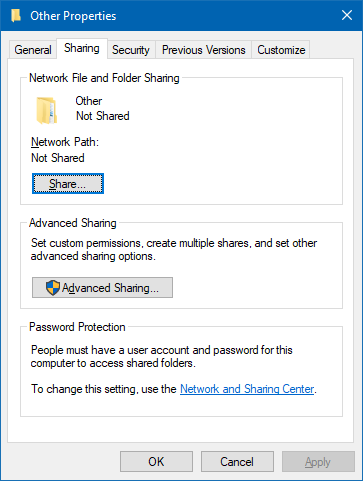
As it turns out, I did do one thing in parallel to this event showing up. I had right-clicked on a folder in Windows Explorer, selected Properties, and then, went through the five tabs shown yonder. So I thought, hm, okay, could this be a trigger. Very quickly, I narrowed the audit failure down to accessing the Sharing tab under Properties. It would seem Windows tries to check whether the folder path would be accessible from other systems (over the network), and for that, it tries to use the Guest account. If said account is disabled on your machine, which it most likely ought to be, you will have an error, which will then be logged as a failed audit. To verify this assumption, I tried Properties > Sharing for multiple folders on two separate hosts. The behavior is identical, and the audit failure timestamp matches the folder access. That's all there is to it.
Conclusion
Well, there you go. This seems like a no-problem problem, but the error itself is quite alarming. I guess the system does need some way to check whether the shared folder will be accessible, then again, since it can't really do the check, the error is meaningless. The funniest thing is, you can completely avoid this error if you use the Advanced Sharing option in the right-click menu. I'm not sure if that's still available in the failure operating system called Windows 11 (and its crippled context menu), but it does work in Windows 10.
If you encounter logon audit failures, do remember that you could actually have real logon issues. But in the home environment, especially if your local systems are behind a firewall and/or router, this will most likely be a false positive generated by accessing the Sharing tab. Thus, you can put your mild paranoia to rest, and enjoy using your machine. Well, enjoy seems to be a high word. Mildly suffer then. Take care.
Cheers.