Updated: August 12, 2026
I think I've just discovered the most annoying Windows "feature" just yet. On a system, in the Event Log, out of the blue seemingly, I discovered 15 warning messages, all from RestartManager, with the Event ID 10010. The description read: Application 'C:\Program Files\Mozilla Firefox\firefox.exe' (pid 14744) cannot be restarted - Application SID does not match Conductor SID.. (a double period symbol is part of that). What.
This looked quite weird. Why would Firefox suddenly experience this issue? I started digging. The Mozilla maintenance service was working as it should, there were no browser updates, and it was running correctly. Online, I found possible reasons for the issue, anything from "ignore" to "hardware problems". The whole vast Internet didn't have much to offer. So I went digging some more, and I think I have a nice story for you. Please follow me.
Problem investigation in more detail
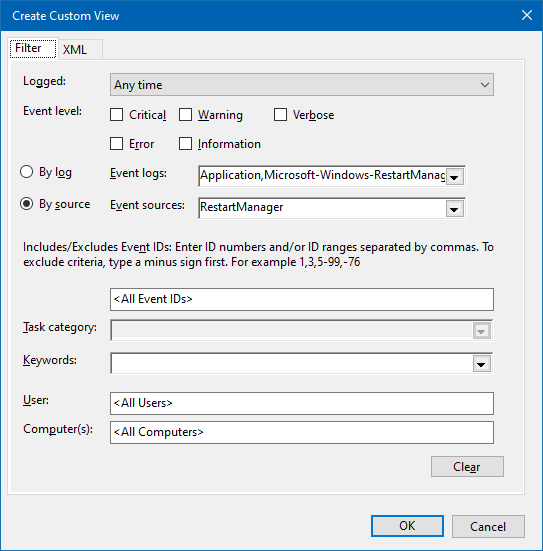
On this host, the RestartManager warnings go all the way back to 2024, when I encountered two instances of the same issue with Skype. Back then, I must have missed or ignored those. All right. I then looked at a different Windows machine. There, in the Event Log, I created a custom view, which filters messages only from RestartManager. I discovered a whole trove of messages, both in the Warning and Information categories. Apparently, the other machine had no less than 46 entries. And they also seem to have affected Firefox. Should we blame Firefox? Absolutely not, as I will show you soon.
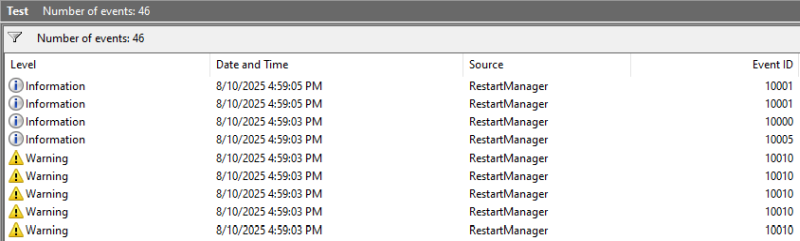
I noticed that the messages had different Event IDs, including 10001 and 10005. The latter one is quite interesting, because it reads: Machine restart is required. What? What sort of nonsense is this? I went back to the first host, and lo and behold, I found the same entry, dated to the Firefox restart event.
Apparently, something on my host wanted a reboot, but that, in relation to Firefox, made absolutely no sense. And the question is, of course, have I done anything on the system that could, potentially, warrant this sort of the scenario? The answer is (sort of) yes. Here's what happened:
- My Windows machine A with the Firefox restart message threw this warning at 2108 hours.
- At about that same time, I was running Steam on this machine. Firefox was also open.
- Steam had a redistributable update, which it then installed.
- Apparently, it seems that this setup triggered both the Firefox error and the "machine restart" info.
Solution, putting it all together
Now, let's go sequentially through the different events. For this, I looked into the entire Information section, and there's a lot of goodies, if one is willing to read and explore.
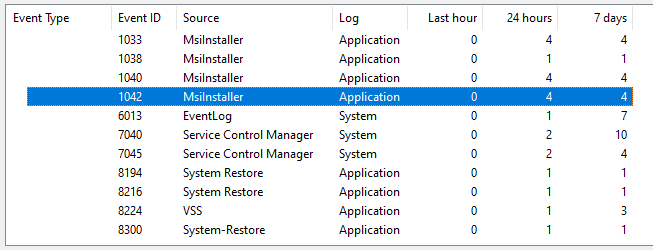
- First, Steam installs its redistributable. Windows takes over.
- We have Event ID 1040 from MsiInstaller:
Beginning a Windows Installer transaction: C:\ProgramData\Package
Cache\{6FB497AF-6B75-4C6D-87EE-761D92308736}v14.51.36247\packages\
vcRuntimeAdditional_amd64\vc_runtimeAdditional_x64.msi. Client Process Id: 10252.
- Next, we have Event ID 1030, a successful installation:
Windows Installer installed the product. Product Name: Microsoft Visual C++ 2022 X64 Additional Runtime - 14.51.36247. Product Version: 14.51.36247. Product Language: 1033. Manufacturer: Microsoft Corporation. Installation success or error status: 0.
- The MSI installer sees that certain processes are currently using a certain DLL. Event ID 1025, and there's a whole bunch of these, one per Firefox process (thread):
Product: Microsoft Visual C++ 2022 X64 Minimum Runtime - 14.51.36247. The file C:\WINDOWS\system32\vcruntime140_1.dll is being used by the following process: Name: firefox , Id 14744.
- The installer tries to restart Firefox, but the instruction comes from a different context. Steam runs as its own thingie, Mozilla runs as its own thingie, hence Event ID 10010:
Application 'C:\Program Files\Mozilla Firefox\firefox.exe' (pid 14744) cannot be restarted - Application SID does not match Conductor SID..
- Because the installer cannot restart the affected process, it wants a system reboot. Events 1038 and 1029:
Windows Installer requires a system restart. Product Name: Microsoft Visual C++ 2022 X64 Minimum Runtime - 14.51.36247. Product Version: 14.51.36247. Product Language: 1033. Manufacturer: Microsoft Corporation. Type of System Restart: 2. Reason for Restart: 1
Product: Microsoft Visual C++ 2022 X64 Minimum Runtime - 14.51.36247. Restart required. The installation or update for the product required a restart for all changes to take effect. The restart was deferred to a later time.
- Because my system is configured correctly, Windows cannot randomly restart the machine. Hence the deferral, hence Event 10005:
Machine restart is required.
So what do we have here?
We obviously have bad, nerdy design. Notice the Event IDs are out of sequence. Notice the overzealous MSI package behavior. Notice the pointless insistence of restart. The only thing that matters is that one could, if needed, simply reopen the browser, done.
I also didn't edit any of the messages above, including extra spaces, dots, and whatnot.
And there you go, fellas.
Conclusion
One should never look at system logs, unless they have plenty of time and patience to handle potential problems. Event ID 10010 is exactly that kind of thing. What annoyed me is the ultra-nerdy description and phrasing, because it simply doesn't help in any way figure out what the issue is. Permissions, duh! Of course, Steam and anything spawned from its context cannot restart Firefox, duh. The whole system restart thing is also a bit funny.
Here you go. If you're facing similar, seemingly inexplicable torrents of Event ID 10010 and friends, do take a look at the Information section. It's possible you simply had an installation of a package, completely unrelated, and there was an active process with an open file handle at that time, and Windows freaked out and went into an over-verbose mode. For those among you wondering about the security aspect, the handful of DLLs from the installation have the right digital signature, the hashes also match the same DLLs on other, unrelated systems, and they come out clean from a VirusTotal scan, if you're perhaps wondering about that angle. And we're done. Hopefully, this article slash tutorial will help you figure out your own woes and nonsense with Windows. Bye bye for now, dear readers.
Cheers.