Updated: March 13, 2026
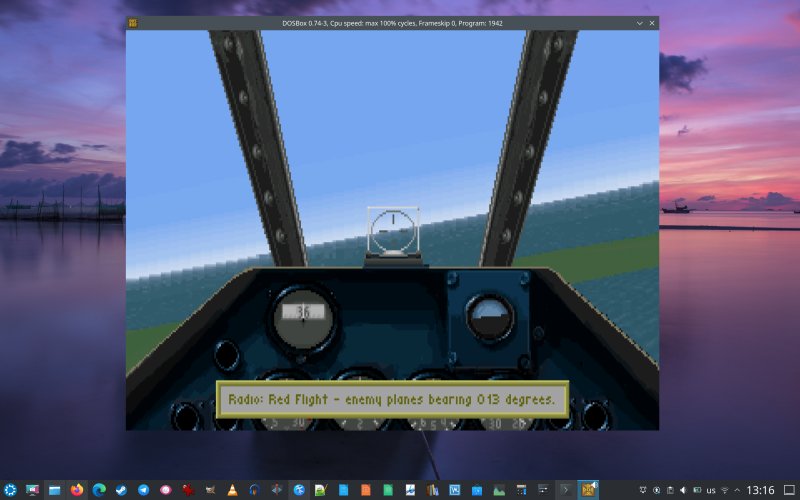
Recently, I've done quite a lot of DOS-related stuff. It all started because of one awesome game, the lovely WW2 simulator called 1942: Pacific Air War. As it happens, this humble old title introduced all manner of challenges into my modern gaming world, including both performance and sound issues, which you sort of wouldn't expect. Namely, the simulator wouldn't run as fast as you'd expect some thirty plus years after its inception, and the sound wouldn't work correctly, either.
I resolved both these issues, as I've shown you in my dedicated DOSBox sound in Linux tutorial and the related performance guide. Now, I would like to build up on these two pieces, and give you yet more tips and tricks on how to enhance your modern-day DOS experience. To wit, we shall start with the sound once more, and then, in a sequel, cover the game speed element, too. And much as I've shown you above, these two will also nicely dovetail together. Now, let us commence.
Improve Sound Blaster 16 configuration
In my previous sound-related article, we talked about using timidity for MIDI, which helped us get along quite nicely. Now, let's try a slightly different approach. Let's tweak the DOSBox Sound Blaster configuration section. Namely, the default setup reads as follows:
sbtype=sb16
sbbase=220
irq=7
dma=1
hdma=5
sbmixer=true
oplmode=auto
oplemu=default
oplrate=44100
We want to change a single line:
oplmode=opl3
With this change in place, it is now possible to get all the different sounds in the simulator. There's one caveat, though. I had to disable the digital sound option in the game.
But we want digital sound!
OK, let's try a slightly different approach. Instead of using the Sound Blaster 16 device, let's try AdLib Gold. I opened DOSBox, mounted the C: drive, and relaunched the sound configuration program. In my case, with 1942, the utility is called INSTALL.EXE. Here, I reran the sound setup, and instead of MIDI, I chose AdLib Gold, using the default values.
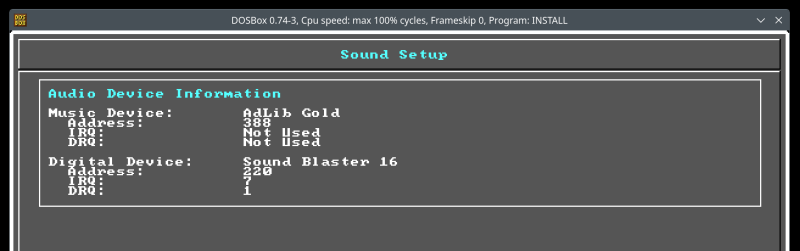
Once I completed this step, I fired up the simulator. I still had to disable digital sound. And then, I had the full set of effects, but they sounded [sic] different than what we had before. Deeper, richer. In essence, this change resulted in a high-quality set of game sounds, even though, supposedly, it should not matter, as we only tweaked the Music Device. But I'm reporting the results as is, so you can play on your own. With 1942, with the digital sound disabled, you can hear the AAA explosions and aircraft gun firing. With the digital sound enabled, you can only hear the engines and the bomb release effects. And you will get different results for Sound Blaster 16 and AdLib Gold, provided you tweaked the emulator.
Launch DOSBox with different configuration
The beauty of DOS games is that they are relatively small and self-contained. Thus, you can freely experiment. Make copies of game folders, and try them with different DOSBox configurations, including all sorts of sound options. For example, you could also try:
sbbase=388
oplmode=opl3
Then, set the Digital Device also to AdLib Gold, and this ought to allow the use of digital sounds. Lastly, there's one more trick that helps with the sound, and you guessed it right, it's related to performance, as in by changing the emulation speed, we will help on the sound front, too. We will cover this separately in a follow-up tutorial. For now, if you have a configuration you like, but don't want to use it for all of your game titles, only specific select ones, you can launch DOSBox with the conf flag:
dosbox -conf path-to-new-config
For example:
dosbox -conf /home/dedoimedo/.dosbox/dosbox-0.74-3-my-game4.conf
Conclusion
It feels uncanny and super fun playing with ancient games and making them work perfectly on modern systems. I am baffled that this is the case, but then, emulation is still emulation, and there's no guarantee of 100% fidelity. Furthermore, Linux may also be part of the equation, as it's my host. Still, I'm enjoying the process. On top of that, I also get to play some timeless classic. You may feel cynical, jaded or skeptical, but once you give these old games a whirl, you will realize they are hard, uncompromising, and rather sophisticated, despite and because of their tiny size. Better than many a graphics-rich new game, too.
Our next endeavor will touch on performance once more. This time, we will handle memory management no less, and combine goodies from the FreeDOS world with those of the DOSBox emulator, which should help make the flight simulator work even better. Once again, the bonus of these performance tweaks will be the digital sound working correctly. Stay tuned.
Cheers.