Updated: August 26, 2026
For many years, OpenOffice was my go-to non-Microsoft office suite. I used it well, and extensively, and even wrote a whole bunch of articles on its use, including various different tools and spins and such. But then, LibreOffice happened, and OpenOffice sort of languished behind. Funnily, I was under the impression that the development had ceased. To my amazement, recently, I figured that this wasn't the case. While the pace ain't relativistic, there sure are up-to-date versions of the software available. So I thought, well, I must take it for a ride, no.
And so I downloaded the archive from the Apache Foundation servers, extracted the several dozen DEBs, and set about testing. After all, it would be quite interesting to see how OpenOffice has evolved, and examine its relevance in the FOSS community. In particular, I'm quite keen on the Microsoft file format support, so I can leave the proprietary ship forever behind. Let's commence then.
Installation
This turned out to be harder than I expected. After all, as a direct successor slash fork, LibreOffice shares the namespace with OpenOffice (all the way back to Sun Microsystems and then some). When I tried to install the DEB packages, I saw a lot of errors:
The following packages have unmet dependencies:
libreoffice-base-core : Depends: libreoffice-core (= 4:24.2.7-0ubuntu0.24.04.6) but it is not
going to be installed or libreoffice-core-nogui (= 4:24.2.7-0ubuntu0.24.04.6) but it is not going to be
installed
E: Error, pkgProblemResolver::Resolve generated breaks, this may be caused by held packages.
Trust me, I wasn't doing anything with LibreOffice. Well, I figured the way "forward" was to remove LibreOffice from my Kubuntu system, install the OpenOffice bundle with dpkg, and then see what gives. Well, nothing gives. I also needed to install the desktop-integration package, and finally, OpenOffice was there.
And then ...
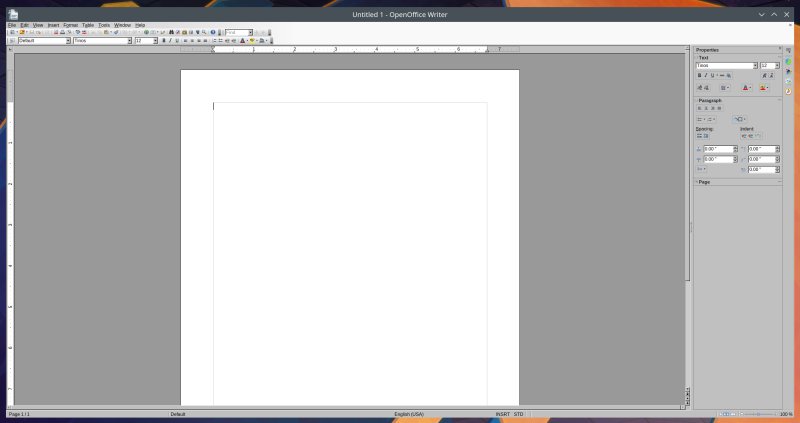
Ugh. When I launched the program, the visuals were quite bad. I guess OpenOffice uses an ancient Gtk theme that doesn't have any proper support in modern versions of Linux, or in my case, Plasma 5 in Kubuntu 24.04. There was no scaling either, so everything look odd and mangled. Now, this makes for a very difficult usecase, right then. After all, if one cannot comfortably utilize the UI, then, does the program even have any merit?
Microsoft file format compatibility
Maybe it does. I decided to explore this option. Perhaps the bad looks can be solved, and if the DOCX support is good, then, at the very least, I can use OpenOffice as my conversion "filter", if nothing else. That alone would indeed merit usage. I grabbed the same four templates I used in my Zoho Writer review, and tried to open them here.
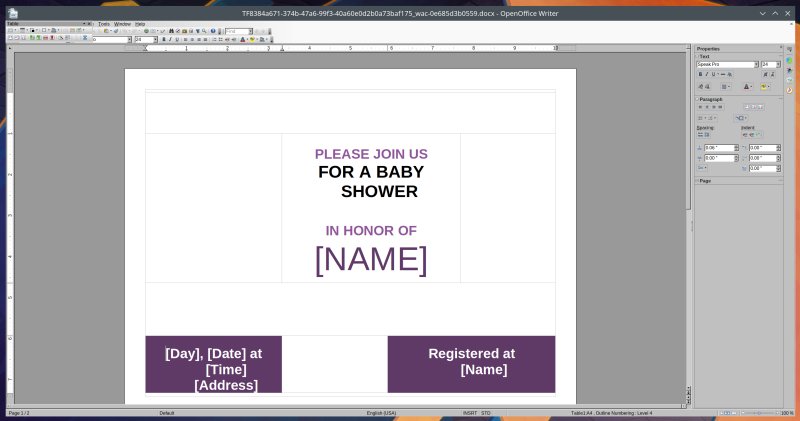
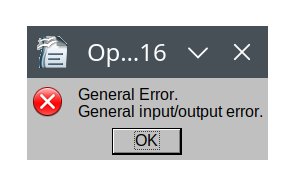
The results were more than underwhelming. OpenOffice 4.1.16 (released in late 2025) managed to open only one document fully. The remaining three threw input/output errors. Now, I used to get these sort of issues in LibreOffice a while back, but not recently. On top of that, even the one document that did open looked totally wrong. Missing, misaligned elements, you name it.
And with great, great sadness, I stopped my testing right there and then.
Conclusion
It would seem my journey with OpenOffice is not meant to be. It had ended back then, and I didn't quite know this would be the case until today. You know, you do something, and don't realize that it's going to be the last time you ever do it. That sort of nostalgia hits hard. Alas, the difficult setup, the visual glitches and the subpar support for Microsoft documents all preclude me from using this software in the current era. When I reviewed LibreOffice 4 back in 2013, that was it, then, it seems. The split-off program offers quite a lot more streamlined experience across multiple platforms, and it's easily and readily available in many a Linux distro repo. There's better if still not quite sufficient support for proprietary formats, too.
I will forever be grateful for the fun times and solid usability I had with OpenOffice. I enjoyed my time with this program. Now, officially, I have all my answers, and I must lay it to rest, respectfully. It's done well, but time and change have overtaken its usability. It just does not seem practical enough for the typical 2026 office suite challenges. It might still be worth testing, if you like, and you may find it better for your own needs. In Linux, you most likely can't have it installed side by side with LibreOffice, so take note of that. And be prepared for some glitches and errors. Now, we must end. Curtain.
Cheers.