Updated: March 6, 2026
Hear hear. I am happy to report that, after almost thirty years of competition in software-induced hardware instability, Windows has finally managed to catch up with Linux. A couple of months ago, Windows managed to give me its most poetic farewell gift, a string of BSOD crashes on a system that was, until that point, spotlessly stable and robust. After I had applied the July 2025 updates, a desktop system began crashing randomly. Its reliability factor went from hero to zero. Not unlike the issues that plague my Linux machines. Oh the excitement!
My approach to computer problems is always self-centered. I always assume that somehow I had caused the issue, or that my system is at fault. And every single time, every single time, it turns out, no, it's not me, it's shitty software peddled by this or that vendor that ruined my tranquility and made my hardware misbehave. This incident seems to be no different, so let me tell you a lovely story. It began in July, with an innocent monthly update. It escalated into a set of BSOD. Follow me.
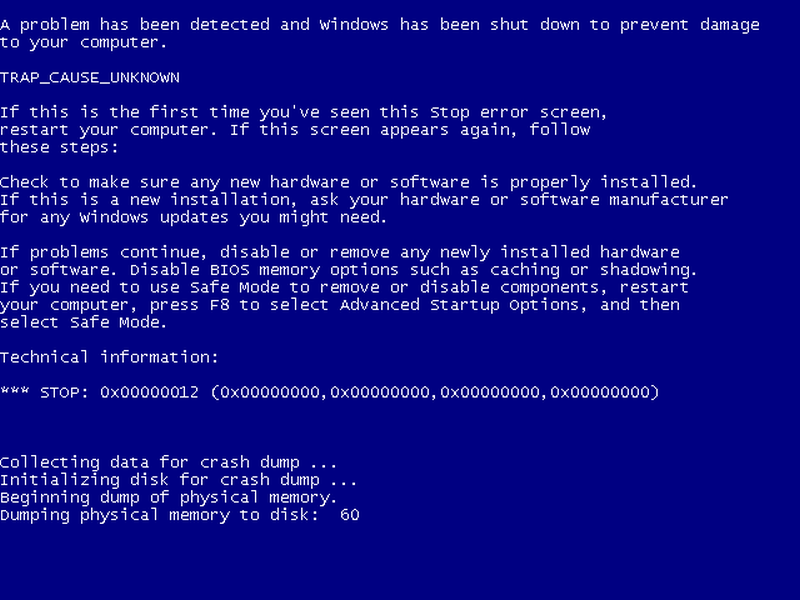
A symbolic representation of what gives. In Windows 10, the color is light blue, cor.
An idle system goes eeeek
One Saturday morning, I woke up and I noticed my desktop had reboot itself. Hm. I looked into the Event Viewer, and could not see anything other than the kernel power event, ergo a system having shut down unexpectedly. Then, as I tried to open a text file in Notepad++, the system experienced a BSOD. An exception caused in the main kernel thread, not one of the drivers. OK. Weird. Now, be aware I am quite proficient in the analysis of kernel crashes. This particular event didn't indicate any particular culprit.
After the system recovered, I ran a system scan and DISM repair. Once I completed this step, I let the system be. For the next week or so, twice a day, it would pop up a shitty dialog that read "Something happened". Despite my best intentions, I could not figure what the source of the issue was.
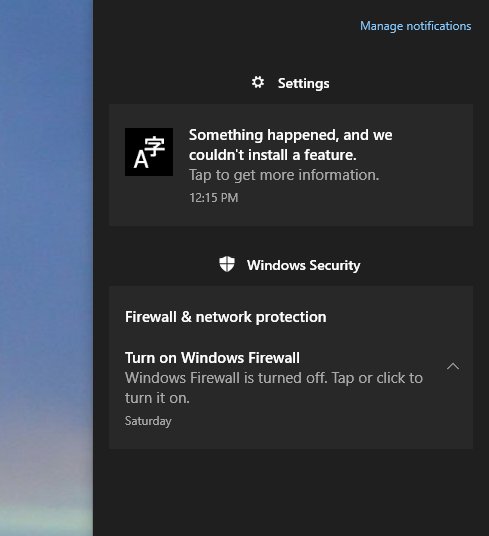
Eventually, under the Information section in Event Viewer, I found this:
WindowsUpdateclient, Event 44
Windows Update started downloading an update.
2025-07 Cumulative Update for Windows 10 Version 22H2 for x64-based Systems (KB5062554)
Apparently, the system was trying to redownload the July update but it could not. So apparently, there was something horribly wrong in this patch. A few days later, the machine crashed again, overnight, with no activity on the system. The next day, I tried to run Windows Update, but it simply could not grab any updates, not July nor anything newer.
At this point, I decided to restore the system image to slightly after the July patch. This is something I've been doing with Windows since XP - take a full image before and after a monthly patch, whenever I run it, that is. Thus, if Microsoft introduces bugs, I can roll back.
I restored the August snapshot, and while the system was booting up following restore, it had another BSOD, before the desktop had even loaded. Inside the desktop, I patched the system to the October set, the last one available for Windows 10 (if you don't want to play the Windows ESU games). This solved the "Something happened" error.
About 11 days later, the system BSOD-ed while I was using the file manager. Another kernel function error, with an almost identical address (offset). At this point, I decided to roll back all the way before July. Effectively, I used a pre-July system image.
Did this help? I will tell you soon. Let me briefly outline the full sequence of events ...
Timetable of suck
OK, folks, so, here's what happened:
- A perfectly stable desktop receives its July patch in early August. I need to point out I only updated Windows, I did not touch any drivers, at all. I've set my system not to update drivers automatically.
- A couple of weeks later, I notice a dwm.exe error in Event Viewer. I'm bringing this up, as it may be pertinent to the issue.
- A few days after this, we have the overnight crash, no BSOD.
- The day after, we have the first crash with a collected minidump file.
- About two weeks later, we have another idle system overnight crash, no BSOD generated.
- System restore to just after the July update, BSOD on boot.
- Update to October 2025 level.
- An Nvidia driver error in the Event Viewer a few days later (while the system was doing nothing):
Faulting application name: NVDisplay.Container.exe, version: 1.39.3323.1171
Faulting module name: ntdll.dll, version: 10.0.19041.6456
Exception code: 0xc0000005
- Four days later, we have the final recorded BSOD.
- System restore to before July update.
And ... the system has been rock rather solid since, for three months now.
Ah, Nvidia, hardware, drivers, blah blah
No. Yes, I had the exact same thoughts. But hey, I've not updated my drivers. So why should we blame the drivers then? Also, how would that explain the system crash on boot before the desktop even loaded? That would eliminate Nvidia from the equation, would it not?
Hardware? Well, the Windows hardware event log is empty. The reliability report is empty. And everything is working superbly under load. I tested the system (with post-July updates) playing numerous games, running 16-thread 7z operation, doing 3D design, everything. No issues really.
The problems only even happened when the system was idle ...
Idle system, eureka!
I have to admit, at this point I got a little upset. Having done tons of work on kernel crashes in the enterprise space, I have all too often experienced systems with on-idle kernel panic. And yes, those would often have different exception codes, and they would usually be caused by a faulty CPU or memory.
Going back to my self-centered approach to problem solving, I assumed I may have a hardware issue. But it still didn't make much sense to me, as the issue only manifested itself when there was no load, i.e., the processor was in a low power state.
Then, I went online, and I did a little search: "AMD Ryzen BSOD idle". My oh my. I was flooded with posts and threads discussing the exact same issue as mine. Exact same. People with systems that worked superbly for years suddenly had these frequent crashes. And all of those coincide with July updates. These posts also highlighted a potential workaround: changing the CPU voltage a tiny bit.
And then, it dawned on me. The July update brought in all sorts of side channel attack mitigations, and that probably meant messing up power plans. And if a power plan is ever so slightly off, this could potentially trigger a system crash. Indeed, the quickest and cheapest method to verify this would be to roll back to a system state before the July patching. Luckily, I had the image ready.
And so I rolled the system back.
Observations
Having done a lot of data collection in the past three or four months, here's everything that differs between my Windows 10 before and after the July patches:
- After, I had more application and game crashes, including DWM and Nvidia drivers. Before, none.
- After, my Nvidia card was running a whole 10 degrees C hotter on idle. Yes. It would idle around 46-47, whereas beforehand, it idled around 36-37. And since I've restored the old image, we're back to normal temperatures.
- The system is faster and more responsive with the pre-July state.
- Most importantly, no BSOD with the pre-July state.
Why this issue of a sudden?
Well, cynics among you could say: aha, so this happens just before Windows 10 goes EOL! Indeed, a remedy could perhaps be to "upgrade" to Windows 11. Nope. This is not a conspiracy. What makes far more sense is simple, pure incompetence. After all, for years now, the quality of the Windows desktop has been steadily going down. Legendary monthly updates have become a joke. Microsoft is shifting is resources to Windows 11 and AI and such nonsense, so it's very likely they simply neglected an old system about to retire.
To be absolutely clear: I will never upgrade this system to Windows 11, or use Windows 11, because I'm not in the mood for low-IQ games. "Update your system and drivers" is not a cure to shitty coding. And I will not support that line of thought. Ever. There.
I don't see malice. I see negligence. And if anything, the BSOD only made me more determined never to use Windows for serious stuff, now or in the future. Until recently, I had the "excuse" of Windows being stable and robust, and my Linux being all naughty. But now that both these systems are meh, the would-be "conflict" is gone. Linux is now as viable. But more importantly, I'm very happy that I made the smart choice of buying myself a Macbook Pro. These software worries are now almost entertainment.
Conclusion
Sometimes, it's good to have a rude awakening. When you're not ready yourself, someone else comes and gives you the nudge that you need. Just the right amount of energy to set you in the right direction. I want to thank Microsoft for helping me stop using Windows. I had already decided this, but the series of BSOD made me derisive. To mess up a lovely system so badly, it's like spilling paint over a masterfully drawn piece of art.
Whatever Microsoft did in July, it borked my desktop oh so greatly. Going back in time to the pre-July state fixes everything. Speed, temperatures, application and games stability, and most importantly, system stability. I am quite confident that the issue is 100% software crap. Probably a combination of new mitigations, some Secure Boot nonsense or alike, and power management tweaks, all of which resulted in destroying my peace. Now, me being me, I'm still willing to entertain a potential hardware problem. Yes, there is a tiny non-zero chance that all of the above is a consequence of quirky motherboard, CPU, memory, or whatever. So I must lay down that doubt in writing, too. If any new findings come up, I will sure write about them. However, for now, based on everything I could find, my overall logical conclusion is that this seems to be a software problem.
But it's ok. It doesn't matter. Let this be my Windows legacy. A painful lesson that I will remember well. If there's one thing I despise, it's amateurism, and here we go, Windows now has its gold medal. I can now cope with Linux hardware nonsense more lightly, and bask in the glory of my Macbook. With these bittersweet words, I bid you farewell.
Cheers.