Updated: November 11, 2026
We all know that "modern" software packaging formats like AppImage, Flatpak and the snap are the future, and that they will revolutionize the Linux desktop. Wait, hold on. Nope. That is not correct. This is the Utopian dream that the Linux world (or parts thereof) would like to see happen. And technically, I wouldn't mind having a fire-and-forget solution to my software woes, either. After all, if I can just grab an application, and use it without thinking over 9,000 Linux distro permutations, each with its own incompatible set of libraries, formats and whatnot, sure, I would be very happy.
Alas, in the last couple of months, a few rather annoying Linux-related things happened, prompting me, yet again, to write about modern Linux software and how it fails the basic goal of straightforward usability. Once again, we have technology rather than philosophy, technobabble rather than function. Let me show you.

Note: Image taken from Wikimedia, licensed under CC BY-SA 4.0.

Everyone asks what Krita is, no one ask who Krita is
Krita is a nice, raster graphics editor, very similar to GIMP. It's developed by the Krita Foundation. As is the case with many a Linux program, if you want newer versions thereof, typically you need to set up a separate repository (if possible) as most distro editions are locked to specific libraries, or you could try one of the modern formats, which ought to give you the latest and greatest, with minimum fuss. Grab a Flatpak, grab a snap, or perhaps grab an AppImage, and you're sorted. Except ...
We go back to the question of trust. Remember my many, many articles on unofficial software hosted in Flathub, and how it's surfaced and shown in different distributions? Indeed, trust is the biggest hurdle with out-of-distro software archives. If you want to use something that does not come from an official website, or hasn't been packaged by the providers of your distro (implicit trust), then you want to use application stores, with a seal of trust that what you get is what you get.
I showed you this very problem with unofficial Steam and Chrome, among the most popular pieces of code out there, across many distributions, including say Zorin 17.3 and openSUSE Tumbleweed, in addition to what I've already linked earlier. Yup.
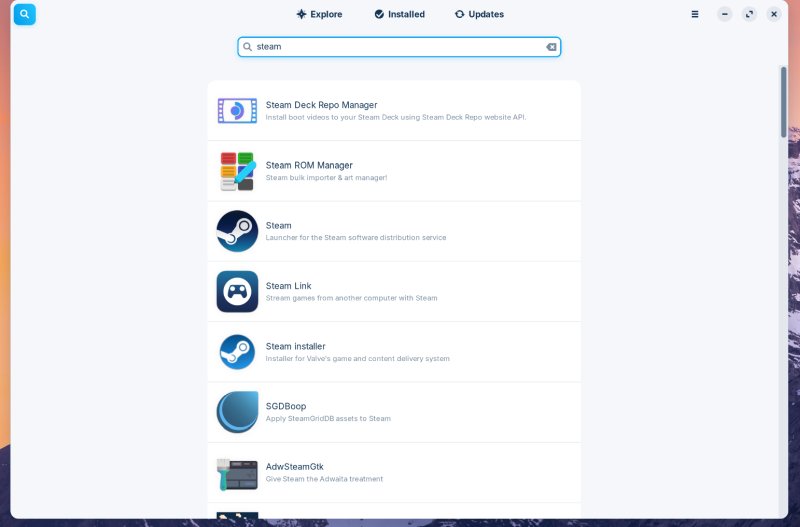
Pray tell, which entry is the official Valve Steam item? Hint: not the first one.
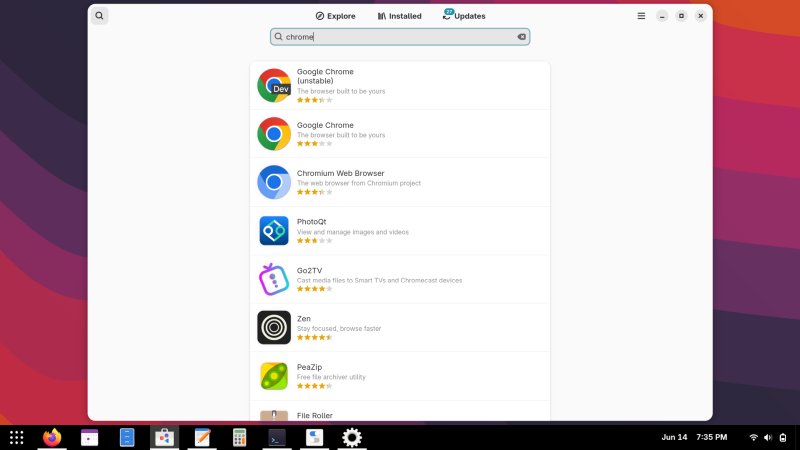
Same here, which one is the official Google Chrome? Hint: it's none of them.
Now, this is a huge problem, but one that can be easily avoided, it seems. Simply, untoggle any unverified software in this or that GUI, and you should be fine. Except, what happens when even the official checkmark of verification isn't quite what you expect?
To my wonder, I discovered this when I tried to grab Krita. Let me show you. Krita's official download page prefers the AppImage format (and for which there aren't any XWayland-related problems and such, even though supposedly, ironically, XWayland is meant to be this golden compatibility layer for apps that are not "ready" for Wayland). The Flatpak and snap packages are also listed, but the official site says that they are maintained by the community. I presume general Linux community. Maybe Krita community? It definitely does not say Krita Foundation.
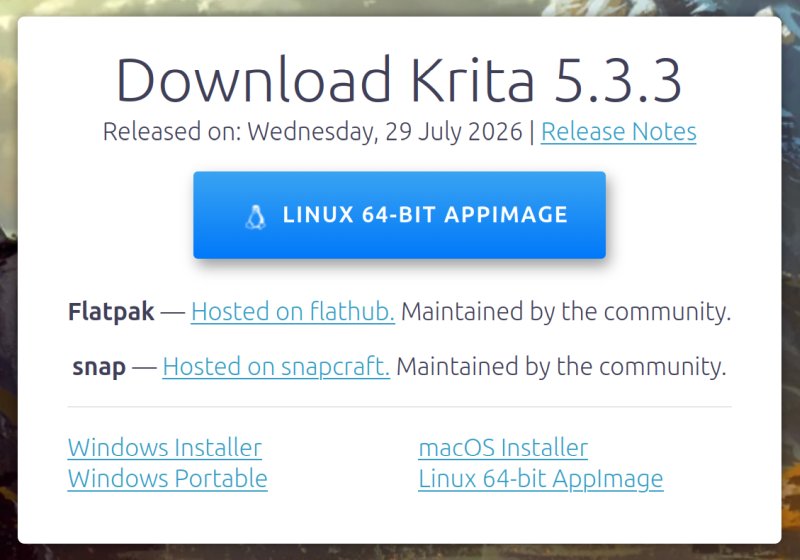
If you go to Flathub and the Snap Store, you will see these:
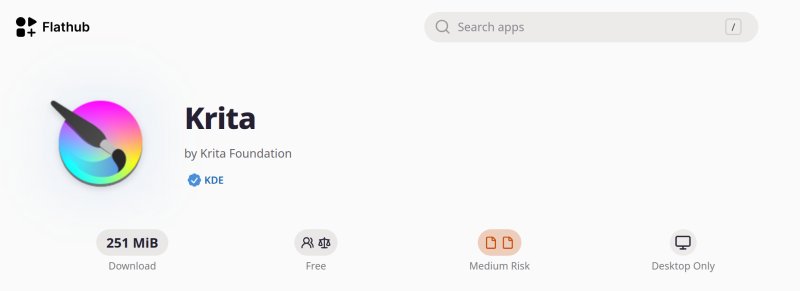
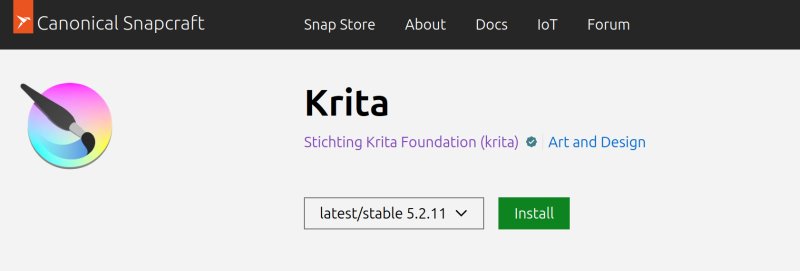
Let's ignore for a moment the totally bland and unappealing design of the stores for the wider audiences. The simple problem is, the information shown on the official site and in these two other locations seems to be mutually incompatible. Flathub says Krita Foundation, whereas the verified tick mark is for KDE. Snap Store says Stichting Krita Foundation. So what do I take from here? Three sources, three versions of truth.
Now, I KNOW that, most likely, 99.99%, a member of the Krita Foundation maintains the packages, even though the Foundation itself hasn't "properly" endorsed these packages. Perhaps. What matters to me is that three different sources write three different things. I would say the official site is the authoritative one. Hence, the two application stores do not reflect that, pure and simple. And if that's the case, as it could be a simple administrative matter, or a tiny omission, then what about the hundreds or thousands of other verified packages in these stores?
I am well aware that someone will link this article on Reddit or alike, and then 50 people will write things like: "he doesn't know how to Linux", "you can easily check the YAML manifest", and similar nerdy stuff. What matters to me is this thing is a huge, huge blocker to the Linux adoption, especially in the era of AI nonsense, when anyone and everyone can easily spin up a convincing site and sell garbage by the metric ton within seconds. This nerdy discrepancy simply does not compute, any which way.
And then, VLC 3.0.24 ...
Just recently, VLC got its most significant update in years. Not only does this wonderful little player get a brand new version of ffmpeg under the hood, the latest version also fixes a whole bunch of security vulnerabilities. So you want to use it, right.
In my Kubuntu 24.04, the repository version, at the time of writing, was still only showing VLC 3.0.20. Now, VLC is one of those apps covered by Ubuntu's Pro offering under ESM Apps. So, on my Pro-enabled machines, I ought to see the necessary patches, even if ordinary Ubuntus might not get them, although it makes no sense not to fix these vulnerabilities in fully supposed LTS, regardless of anything.
But as I said, within roughly three weeks since the official release, I've not seen a patched VLC. So I decided to install the snap version, which has been bumped to 3.0.24. Neat. This means I can have a fully updated media player, no worries. Best of all, you can keep both the Deb and snap versions, use them side by side, and even associate different file types with each. Full flexibility.
What about the actual functionality, though?
And here we get into the second aspect of "modern" software. To this day, Flatpaks and snaps do not offer 1:1 functionality parity to their RPM and Deb counterparts, in most cases. And when you consider the "push" for atomic distros, a totally unnecessary Googlesque effort, you ought to be worried, because if your application layer is a set of mildly broken containerized apps that work only 86% as well as their classic rivals, then that's the future I do not want in any way, shape or form.
Samba ...
How is this relevant to the VLC snap? Well, I happen to have a bunch of Samba shares, and I like to stream data from them. Y'know, the Linux desktop is only 1% or so, hence having stuff on other operating systems and file formats is a perfectly acceptable modus operandi. The Deb-packaged VLC from the archives has no problem streaming files from these network shares. In fact, I have a playlist with roughly 1,000 items, and it works seamlessly in VLC 3.0.20, Deb style.
When I wanted to play these files in the snap-packaged VLC, here's what happened:
- I tried to open the playlist, and I got a whole bunch of cannot open MRL thingie errors. I went into the VLC preferences, and made sure to re-configure the Samba module, but still, no luck. VLC would spout the following error:
dsm stream error: Unable to connect/negotiate SMB session
- Even activating the ancient SMBv1 protocol did not work.
- To make things worse, you can play from Samba, but ONLY if you go through the File menu in VLC. If you double-click on a file in Dolphin, with the share mounted and open in the file manager, it won't work.
- I tried creating a new playlist. The enumeration is slow. It took about 15 minutes for the VLC snap to list all of these files (roughly one per second). The standard Deb-packaged VLC merely needed about 30 seconds to get everything in. Then, I compared the contents of the playlist to what I had from before.
- The snap version created the list with paths pointing to /run/user/1000/doc/[random number]/file name. These are usable, but only in the current session. Log out or reboot, and the list becomes a bunch of junk. As it happens, the Deb-packaged VLC shows the standard smb:// path, which does not change, and is reusable every time, as it should be with network mounts.
- Next, I tried to mount the filesystem with CIFS. This worked, the enumeration was still quite slow, and then, no playback at all. I would get a permission denied error, all the time, regardless of the file and directory mode, regardless of anything. The classic VLC would play this CIFS-made list without any problems.
- Looking at the Launchpad build source for the media player, the 3.0.24 is being built for the latest version of Ubuntu, but this hasn't been done yet for the LTS, which, in my mind, take absolutely priority over the interim releases.
Even worse, DVD playback ...
Now, here's the truly awful part. As you know, I'm a big fan of physical media, and I have a nice collection of DVDs, paid with hard-earned money. So, I wanted to play some, but nope. The playback didn't work. There was no video, and the audio ululated between normal sound and silence every second or two. This does not happen in VLC 3.0.20 installed as a Deb, nor does it happen in MPV, MPlayer, SMPlayer. Next, I tried to transcode a file off the DVD and see what gives. Again, most awful results.
VLC as a snap would do this at an abysmal rate of 500 KB/s, with maybe 1-2% CPU utilization and the same video-audio results as above. Doing the same process with VLC as a Deb would transcode at a rather respectable 5 MB/s, and the CPU utilization would be around 200-300%. Effectively, two to three orders of magnitude better. Plus, the actual transcoded files have perfect video and audio.
The reason is quite simple: VLC as a snap does not ship with all the libraries you need for DVD playback. Check the VideoLAN website to see the explanation, as well as how to download and build these libraries if you need them. But while you can do this for the Deb package, you CANNOT do this for the snap, as the snap is a self-contained read-only archive, by design. The same applies to Flatpak really, and this is one of the cardinal reasons why you should not want to use Linux atomic distros, as they will introduce a lot of similar restrictions across a whole range of applications. The common user won't have any ability, flexibility or freedom to use their software as intended.
Now, there is a solution, and I will show you this in a dedicated tutorial, but it's still a load of absolute nonsense. So let me repeat that, yes, you can work around this, you can "edit" the snap to get the job done, but this is not how it's meant to be, nor the intended mode of use. Hence, this is a failure of functionality, big time. Stay tuned for the tutorial.
And that leaves me pretty much nowhere. Meanwhile, in Windows and macOS, I have the new version straight from the official site, boom, Bob's your uncle. Instead, here, in Linux, in Ubuntu, in the most popular desktop distro, I have to "play" 2004-era level of incompatibility games for basic functionality. And yes, Samba is basic functionality. DVD is basic functionality. Even more so since the whole things WORKS in the classic build. And no, I don't want to read any Snapcraft forum post, or waste life figuring out protocols and nonsense when things ought to be simple and straightforward.
You could also say: it's VLC's fault. No. VLC works fully in every permutation except the new application formats. If you do want to read forums and such, you will find tons of old threads about requests for NFS, CIFS and Samba support, network home directories, and alike, without any great progress. Sure, Flatpak and snap have their merit on the security front, to some extent, but if they needlessly curtail functionality, then people will prefer other, easier, more straightforward solutions. Also, how much can we "narrow down" the usage model so that modern package formats deliver? Huh, it's like Wayland. Let's ignore 70% of stuff, because ordinary people don't do that. Well, sure. Why not ignore 100%?
Now, you could also say: Dedo, only a tiny percentage of people use Samba or DVD. I could sort of agree with Samba, but DVD playback? Really? Or is the "modern" future one where you have read-only systems that only let you use your browsers and a "curated" list of approved streaming apps? What's the point?
Well, by that merit, the Linux desktop shouldn't be a thing, either, as it's also used by a tiny percentage of people. In fact, we could invoke Bayes' Theorem, but apply it to software. An operating system must support any feature that has a larger market share than its own. And since Samba and DVD are definitely more used than the Linux desktop, then, the desktop must support these. QED. What's the point of new packaging formats if they merely restrict the user freedom? If the goal is to get into a Chromebook state of affairs, you can stop right there. Chromebooks already exist, they are extremely limited, and no one needs a Linux version of those. And let's not forget, everything works in the classic desktop world, sans so-called modernity.
Conclusion
I know that techies and developers have absolutely no clue why I'm ranting so, and they might even feel angry and indignant that I would dare challenge their darling projects. But the brutal truth of the matter is that Linux desktop functionality is regressing. Daily. A slow rot. Because with every passing year, it becomes even sadder and more ridiculous that certain things stay broken, or worse, get broken. I mean, media player functionality, why should it be so hard? Or figuring out who published the software.
If Linux is ever to have a chance, then whatever solutions it offers, they must be at least as good as the competitors. Look here, you want to securely play your MP4 files, nope. You cannot. You can do your local machine, but anything beyond that, nope, the modern software methods won't let you. And what do you think will happen, a) people abandon their media and use the reduced-functionality software b) people abandon modern and inferior tooling and go back to insecure software that does everything, in this case version 3.0.20 that has zero compatibility problems? And why hasn't the VLC in the repositories been updated to the latest version? It's covered by ESM! Ubuntu Pro! That's the whole point of this framework!
The same goes to finding your software. You want Krita? Well, the repos have outdated versions. You can try the AppImage, but if you want to use the stores, both write something that does not align with the official version, which does not inspire trust, especially considering the security posture of the modern formats. Plus, there's an actual version mismatch, too, to make everything even funnier. So what do I do? Who do I trust? Meanwhile, go Windows, go macOS, you get one version, one source, no headache. And everything works, and you don't need to fret over XWayland, Wayland, portals, and the rest of the technobabble.
That's my report for October 2026. The Year of Linux. Or not.
Cheers.