Updated: August 7, 2026
All right, brace yourselves. If I ever want to use a smartphone that's neither Google's nor Apple's domain, then I can either remember the fun days with the Windows Phone, or try to see if one of the Android-like flavors does the job. At the moment, my choice seems to be the Fairphone, with /e/OS. I set up the device not that long ago, I tested version 4.0 not long thereafter, and now, I want to show you what happens when a person actually tries to use this operating system in earnest.
It all starts with a SIM card. So far, I used the device without one, which meant Wireless connectivity and such, but no proper "phone" usage, and thus, also, no registration of chat programs like Telegram or WhatsApp. Now, regardless of how you feel about these tools, they are an almost inevitable part of the online smartphone experience, and I bet all your non-techie relatives use one or the other. Sure, if one day the world becomes so odious that your only choices will be to constantly QR code and verify yourself to your overlords or try to use something else, then yes, we can talk about happy, Utopian alternatives. For now, let me show what happens when you attempt to use /e/OS in the so-called normie mode. To an extent. Begin, we shall.
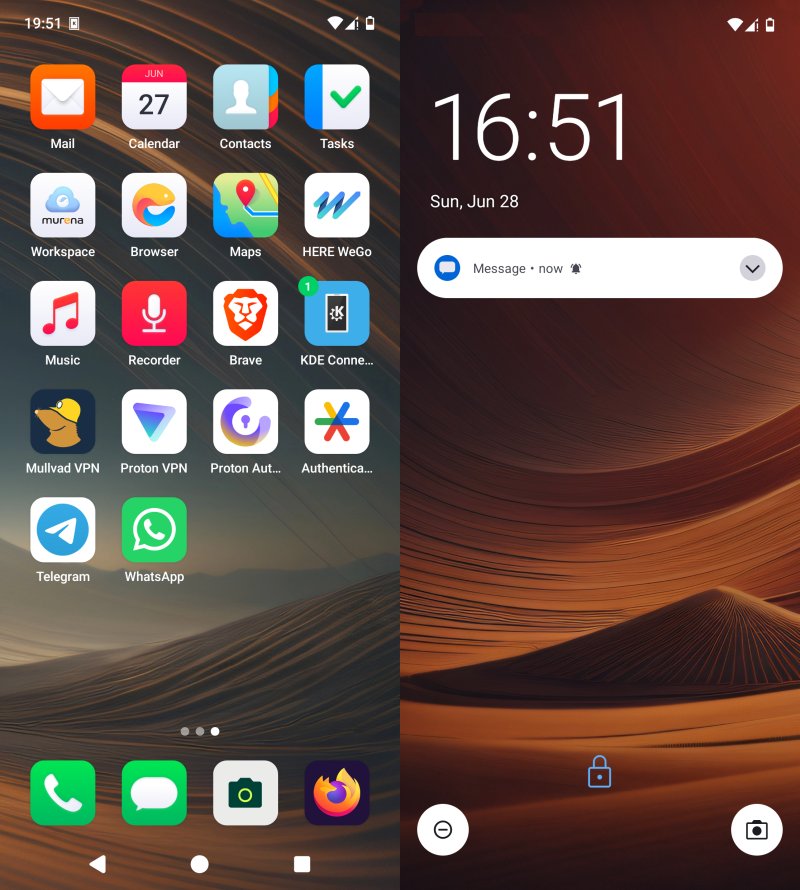
App management is extremely messy
Much as I outlined in my Fedora 44 review recently, and in a rather uncanny semblance to that desktop operating system experience, the software store experience in /e/OS is very Linux-like. That means confusing, fragmented and built on a brittle layer of trust. Let me explain.
After lots of searches and reading, I finally managed to get an okay understanding of how App Lounge works. The app UI is opaque, and it does not tell you what the actual sources for your Android packages are. Or rather, it does, but not in a very clear, distinct way. You have Apps, Open Source and Web Apps. But what this effectively means: Play Store, F-Droid, and then, something else?
The support page says that if an app is open source, and it exists both in Google Play Store and F-Droid, App Lounge will prefer the latter. Okay. Now, let's say you choose something like Proton VPN or VLC. They exist in both places. But they do not seem to be identical! Oh no. Overall, I discovered the following issues:
- Play Store (on Android) and App Lounge do not always agree on the "last update" date for some of the apps. In some cases, yes, the dates match, but in others, they do not. The Play Store usually shows a newer date by several days. What does this mean in practice? How can I actually see what App Lounge actually does? Or perhaps, it's something that MicroG does, as it's the actual intermediary "Play services" in /e/OS.
- The Play Store and the F-Droid versions do not always match. Or if they do, they have slightly different build numbers.
- I couldn't find a way to check if F-Droid APKs are actually verified, and that they come from the actual official vendor. Even if this may be entirely my fault not being able to navigate this store, so to speak, I would still like to be able to inspect the veracity of packages in a quick, easy, unequivocal manner. A simple label that says: "This app is by X and is has been built by X". Very simple, but, then, apparently, it isn't.
And this feels much like official and unofficial packages in FlatHub, Gnome Software offering Flatpaks and not RPMs, even when they actually come from the official source, the confusing and opaque manner by which the end user needs to verify (if at all) the software to make sure they get 100% genuine articles. The semblance is uncanny.
The tragedy here is that the lack of simplicity in the open-source alternatives for the big corpo vampire solutions is that most people will simply give up. They will not fight the ideology battle, and they will choose the easiest and safest option. In some ways, I tend to agree. If I need to install VLC, I want it to come from the original developers. I don't want a community repack. To make things worse, if you check it in App Lounge, the App tab says Videolabs, which matches the Play Store description, but the Open Source tabs says unknown. What. And App Lounge prefers the open-source option! But who is the actual packager of this app? Is this VLC or almost VLC? The problem is just like the Chrome issue I highlighted in the Fedora review.
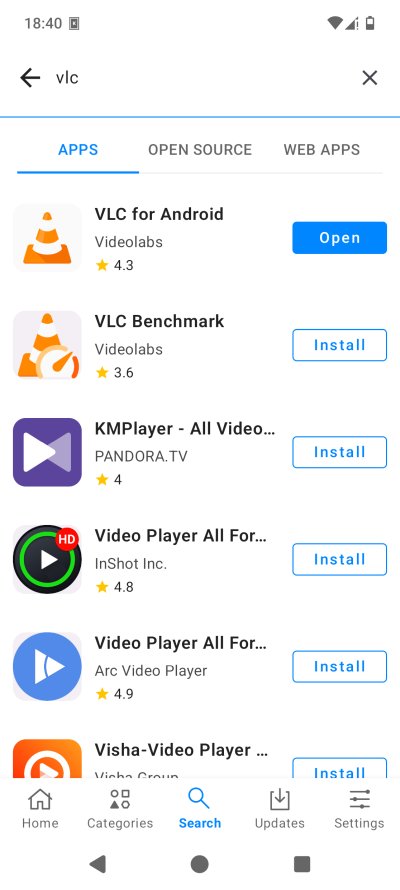
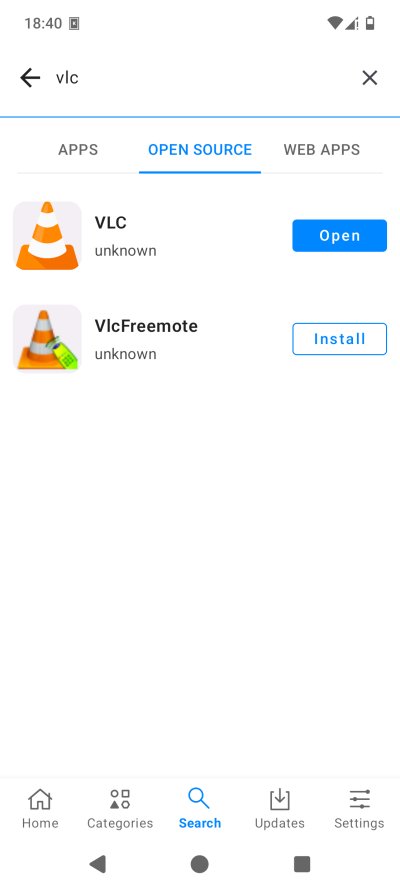
This sort of thing is exactly what the free Android does not need, especially not ahead of Google's attempt to lock down the Android ecosystem with their developer verification program. Now, I'm not naive. A verified app in the Play Store does not necessarily mean anything. And for the most part, it does not. But the alternative to Google's rampage cannot be click-n-pray open-source academic honesty of 2001.
So now I'm thinking, perhaps GrapheneOS does it better? You actually get the Play Store, but it runs sandboxed. Then, this solution may not work at all once Google tightens the screws. The MicroG approach may work still, but you have no strict guarantee that what you get is what you expect to get. And dear nerds, if you want to tell me I'm wrong, please do. But first, make a workflow that is 100% clear. I wouldn't be writing any of this if the actual documentation on how things work in /e/OS and App Lounge provided super-detailed and accurate information on the software management process.
Indeed, let me show you another, even more critical example - Proton Authenticator:
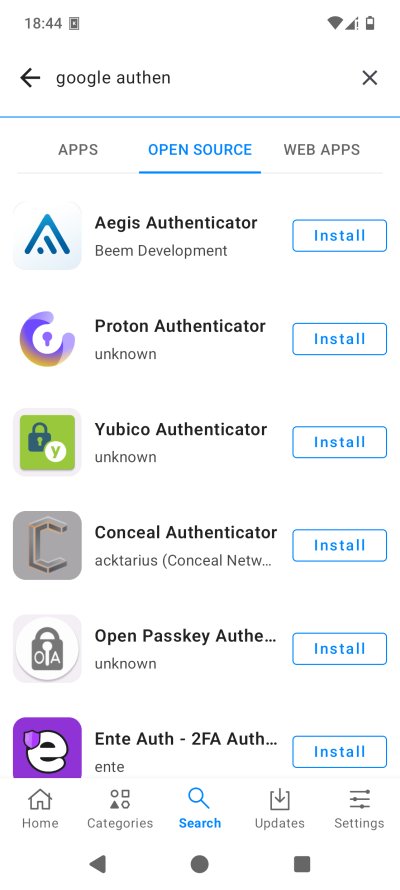
As a tool that holds the seeds for all your 2FA, it needs to be 100% legit, right? You don't want some random program being the host to your codes, now do you, or worse yet, something that pretends to be Proton's official software.
- OK, now I searched for Google Authenticator. Predictably, as a closed-source tool, it does not show in App Lounge on the Open Source tab. But you do see Proton Authenticator listed. Author/developer: unknown. What? How? What?
- Now, I can go Proton directly. They have a link to F-Droid. Awesome. Download the APK, check the signature, check the sum. I can do that on the desktop just fine.
- But then, what do I do on the phone? In App Lounge, I have no option to inspect packages, download them, or anything like that. My only option is to download the package manually through the browser, open it, and let App Lounge handle it. Then again, why would I want this to be my workflow, and if so, why do I need a store?
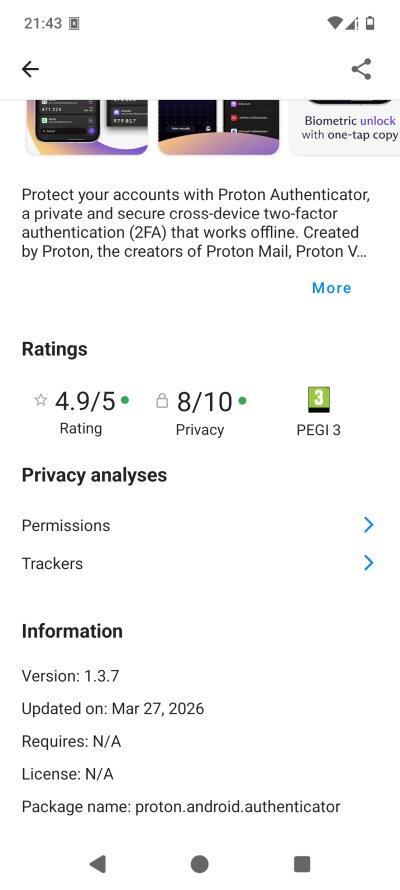
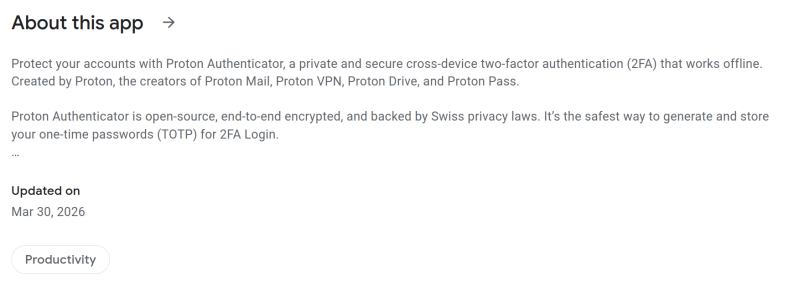
- To make things worse, the date does not agree. What Play Store shows for Proton Authenticator and what App Lounge shows (under Apps, mind) is not the same thing. A few days difference, but what does this mean in practice?
From App Lounge:
And from the Play Store, as seen on me Linux desktop:
What I need is for my phone's non-Google operating system to tell me the following, explicitly, clearly:
- The app you install via App Lounge Apps section matches 100% the Play Store version.
- The app you install via App Lounge Open Source section comes from F-Droid (or whichever) and is 100% original item by the original upstream developer and not a repackaged or recompiled community edition, even if identical.
I don't see these answers anywhere, unfortunately, and this bothers me. Really bothers me ...
And do you realize what the sad outcome of this exercise is?
- I disabled Open Source in App Lounge, because if my choice is using genuine software from one store or software of unknown veracity from another, I will have to choose the former. It doesn't matter if the first option is take-my-blood-and-kidneys Google's rusty cage. It doesn't matter. Because VLC is probably a simple example, but what if it's something a bit more serious? An app that handles proper personal data like the Proton Authenticator?
- I deleted the storage and uninstalled all of the apps that I've set up so far, then reinstalled them, carefully checking the finer details of what App Lounge offers. And I'm still not 100% happy. Because the App Lounge does not show enough information, and the build date for apps does not always match.
To make things even worse, I tried to check the privacy score for some of the apps, but nothing happened. I only saw a little banner titled Exodus Privacy. What. Anyway, I read on what this thing is, and as it turns out, this entity blocks App Lounge requests due to data volumes. Hardly another confidence booster, is it.
But yeah, so now, I'm in a situation where I have a bunch of apps installed. How can I know if they are truly genuine and not mildly bastardized versions of the originals? How? Where's my way to get a certificate of quality for the installed articles?
So yeah, the end result of this exercise is that I don't really trust my phone. Not yet. Not until I have super clear answers how this whole thing works, and that I am not accidentally installing malwarized versions of common, popular software. That's all there is to it. And because of this situation, I hate the world extra, because that means Google's Gulag seems to be the only viable option. They might not have my best interest in mind, but at least there's some small level of data authenticity for the displayed results in the Play Store, at least for the apps I trust. I feel so sad.
And before you say it, I spent days - days! - trying to find information about this. I couldn't find satisfactory answers. Is this indication of /e/OS being small, being Linux-like, or the fact the search engines are awful, or all combined, I don't know. But the frustration in me is immense. I'm like someone standing in the prow of a ship sailing to Numenor, but the shore is out there, out of reach, too far, obscured by mist.
The machine that goes ping
I inserted a SIM card into the slot, booted the phone up. Two things happened. One, the phone turned on Mobile data without my permission, without regard to if I'm abroad or not, if I'm roaming, if I have limited data or such. Extremely annoying. I need to be the one who explicitly toggles data on. I, and no one else. This sort of behavior is what you expect from the big tech, not /e/OS.
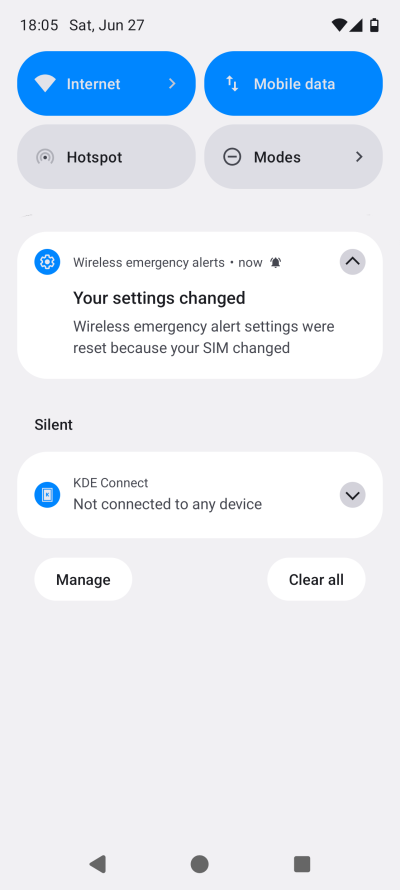
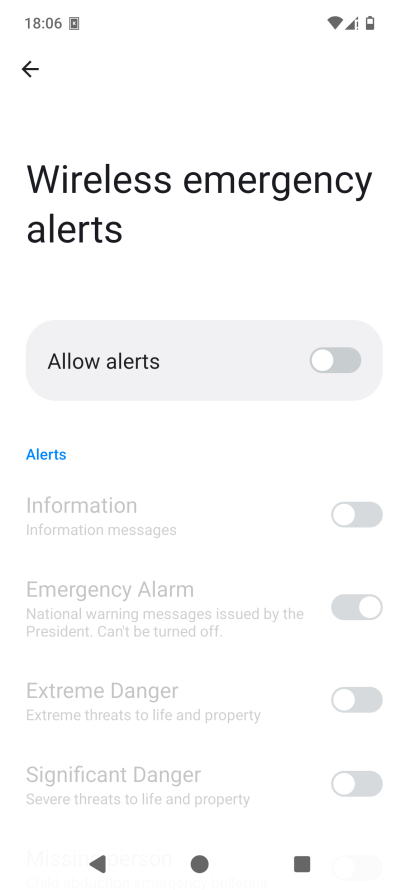
Two, my Wireless emergency alerts settings were changed. Again, without my permission. And now, they also include Presidential alerts, something I mentioned being absent in my original review. Absent and totally irrelevant to my actual physical location on this planet. I know people in California struggle with the concept that other countries exist or matter, but /e/OS should have a more sensible layout in this regard.
Then, I tried setting up Telegram and WhatsApp ...
Some connectivity problems, 2G for the win
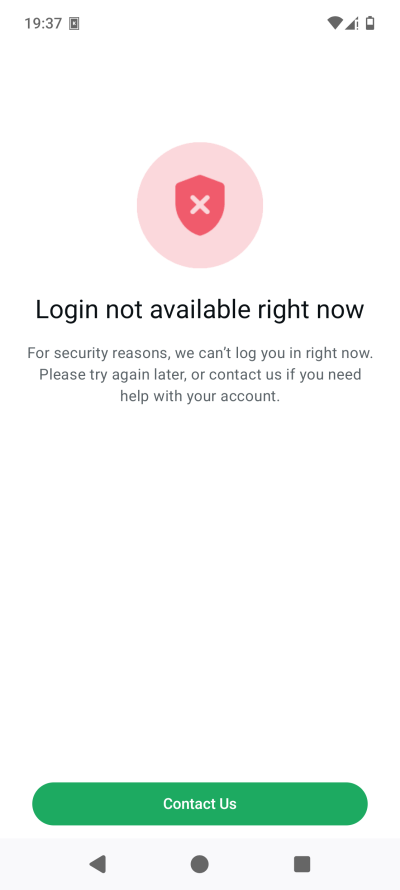
I was able to get Telegram set up fine, even though it insisted on both a phone number and an email address. Why the latter? How's that relevant for the actual usage of the app? I know people can easily generate a random email, but still. With WhatsApp, the experience was also sneaky, but in a different way. The app wants to verify your number, of course. It volunteers to do a missed call verification for you, and for that, it requires access to your call logs. How convenient. You can also use a phone call option - another permission, as you guessed. You can also do the old-fashioned SMS. Another permission, yup.
I tried, and nothing worked. I guess the SMS verification failed as I didn't grant the permission, but there was also no popup to grant one. The calls also didn't work. This seemed quite odd. I mean, the permissions were in place, but the phone stayed silent. I then tried to place a call of my own. Nothing.
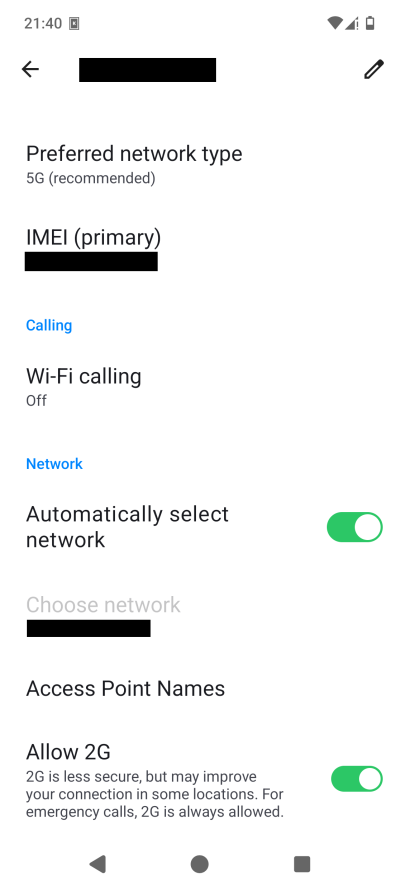
It was then that I remembered changing a setting. I had disabled 2G as part of my mega tweaking. Apparently, the Phone app in /e/OS does not work with 2G disabled - and this has nothing to do with the actual mobile network operator, trust me. I've got another SIM from the same company, and with 2G disabled, phone calls work fine. As it happens, 2G is one of the items covered in Android's advanced protection, as I mentioned a while back. The Lockdown Mode in iOS does the the same thing. So, there, once I re-enabled 2G, WhatsApp was able to verify itself. And it didn't insist on an email. Both programs work fine with zero permissions granted, as it happens. Either way, whatever the actual deep underlying problem root cause is, here you have my findings, and hopefully, they will lead to an improved user experience in the future.
Camera won't work without all files access
I discovered another problem - not sure if this existed before the /e/OS 4.0 update, but seems like a new thing, or I was lucky enough not to encounter the issue before, or I don't remember having encountered the issue before, and now I am being freshly indignant for the second time. But as it happens, the camera requires the All Files Access special permission to work. Without it, when you snap photos, you will see a tiny thumbnail preview, but if you click there, it won't show up anymore, or in your Gallery. However, if you check the DCIM folder, the photos are there, only not enumerated by the photos app.
This is a bit odd, and another Android problem, so to speak. You can deny the camera system modification rights, you can disable its network access, but the file access seems to be crucial. A partial photos & videos access won't do, it seems like. I haven't tried the /e/OS camera app yet, perhaps that one works a bit better, and has fewer friction points.
BlissWeather again
More trouble with this app. As I mentioned, it works but ... then, not quite. It won't show any results if you don't give it Location access at all times - this is counter-privacy - even if the actual Location services are disabled on the phone. Also, 99% of people spend 99% of their time within 30-40km radius of where they live, so there's no reason for any sort of military-precision GPS-assisted weather. It's not like meteorological reports are very accurate. On top of that, it should be the user's choice.
Alas, the app continues to misbehave, even if you give it Location. Sometimes, the widget does not respond, neither the refresh button, nor the settings button. It keeps closing. You can only access it via Apps, but even then, it may crash. Also, it seems you can only use a single custom location. It does not seem to want to let me add three or four frequent places I choose. All in all, a tiny thing, but it's oh so annoying, as it's one of those things that people actually want to use.
Conclusion
This brings me to the end of this article. I don't consider this a piece of my Fairphone long-term report series, as it's entirely operating system related. There are many things to like about /e/OS, but there are also annoying things, some of which should be avoidable (by design). Now, you may think I'm being negative. Go read my Android reviews or my Windows 11 reviews to understand where I'm coming from. My fury toward /e/OS is very mild in comparison. I'm mostly disappointed in that this system is a fantastic opportunity to show the world that Android sans Google is possible. But the demonstration needs to be flawless! Really.
That starts with aligning the system behavior with the message of transparency and privacy that the /e/OS espouses. Really. The two need to be congruent. If I want to use App Lounge, then, that app must infuse me with absolute, sacred trust. Otherwise, if it's the question of not trusting yet another smartphone system provider, then, what's the point? I would like to see blazing bright transparency as to where apps come from, what the source is, what the veracity is. I'll do the thinking whether I want to install something, sure. That's on me. But if I choose XYZ, then it must be the XYZ I expected. Thus, if I believe I'm utilizing the Play Store through a proxy, then it cannot be F-Droid or anything else. The choice must be 1,000,000% explicit.
In some ways, the /e/OS has it harder. Because it must prove that it's doing its work correctly. That means that any discrepancy between what App Lounge shows and what the Play Store shows, the doubt scales will swing toward the latter, as it's the "source". And I would hate for technicalities to determine the success of /e/OS. As the app store already tries to protect you, give you a privacy score and then some, badges of authenticity, veracity, trust and such would enhance its usefulness. Hiding the details under the hood only diminishes its value, unfortunately.
I think there are also all sorts of tiny glitches and problems everywhere. Of course, there are to be expected, as any sort of system tweaking will eventually lead to corner cases. Even a stock operating system is full of bugs. Any change to the baseline only adds to the noise. All that said, I do like /e/OS a lot. I like the look, the feel, the speed, everything. This is a dream come true ... with a major caveat. If I could have my stamp of trust for App Lounge and MicroG tomorrow, I'll be a happy camper. So hopefully, that can get resolved, and I can begin enjoying Android the way it should be. I don't want to go back to the shiny candy prison of idiocracy that's out there. Anyway, stay tuned for more news and updates. Since I've written this article, I discovered a few new problems, including some major ones. But those will need to wait. I shall keep ye posted.
Cheers.